Online Signature in 5 minutes: draw, type and Sign PDF
Online Signature is three connected tools: draw a handwritten mark, type a cursive name, or open a PDF and place signatures, dates, text and stamps on the page. This guide shows how they fit together and how to finish your first signed document.
What you can do
- Draw — sketch with mouse, trackpad, finger or pen; tune ink and stroke; download a trimmed transparent PNG.
- Type — enter your name, pick a handwriting font and ink colour, download a PNG.
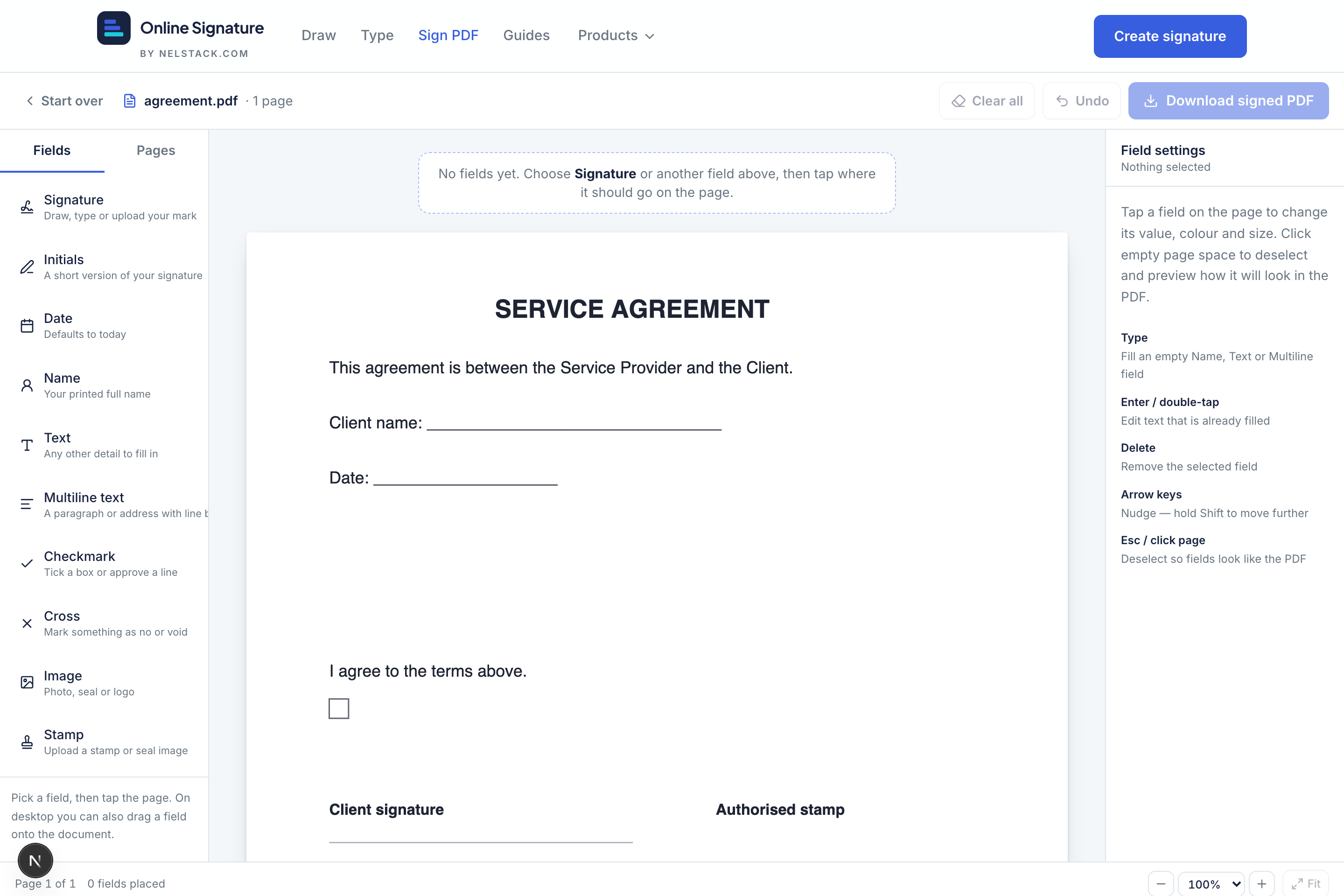
- Sign PDF — open a PDF (up to 15 MB / 30 pages), place 10 field types, capture signatures, then download a flattened signed PDF.
Recommended path for most people
- 1
Open Sign PDF
If you already have a PDF to sign, start there. You can create the signature mark inside Sign PDF (Type, Draw or Upload) — you do not have to leave the page.
- 2
Place the fields you need
Add Signature, Date, Name and any checkmarks or text from the Fields sidebar. Click the page (or drag a field type onto it) to place each one.
- 3
Fill and download
Complete every field, then Download signed PDF. Incomplete fields are blocked until filled so you do not ship a half-signed file.
When to use Draw or Type alone
Need a signature PNG for Rent Receipt Generator, Word or email? Open Draw or Type, download the PNG, and upload it wherever you need it. You can still reuse that file later via Upload inside Sign PDF.
Note
Digital signatures here are visual marks on a PDF or PNG — not a cryptographic digital certificate. Follow your organisation’s policy for legally binding e-sign where required.
Frequently asked questions
Is Online Signature free?
Yes. Draw, type and Sign PDF are free with no signup and no watermark on downloads.
Do my PDFs or signatures upload to Nelstack?
No. Drawing, typing and PDF signing run entirely in your browser. Files never leave your device.
Draw, Type or Sign PDF — which should I open?
Use Sign PDF when you need to fill and sign a document. Use Draw or Type when you only need a reusable signature PNG for Word, receipts or other tools.
Keep learning
- How to sign a PDF online free — complete Sign PDF walkthroughSign a PDF in your browser: upload (15 MB / 30 pages), place signature and fields, capture your mark, download a flattened PDF. Private, free, no signup.
- How to draw a signature online and download a transparent PNGDraw a handwritten signature with mouse or finger. Adjust ink, stroke style, smoothing and taper, then download a free transparent PNG — private on your device.
- How to type a cursive signature online with handwriting fontsType your name in a handwriting font, pick ink colour, and download a free transparent PNG. 14 cursive styles — private in your browser.