Capture a signature for PDF: type, draw, upload and saved marks
Whenever you place a Signature or Initials field — or click Add/Change on an existing one — Sign PDF opens the capture modal. Image and Stamp fields use a simpler upload-only version of the same flow.
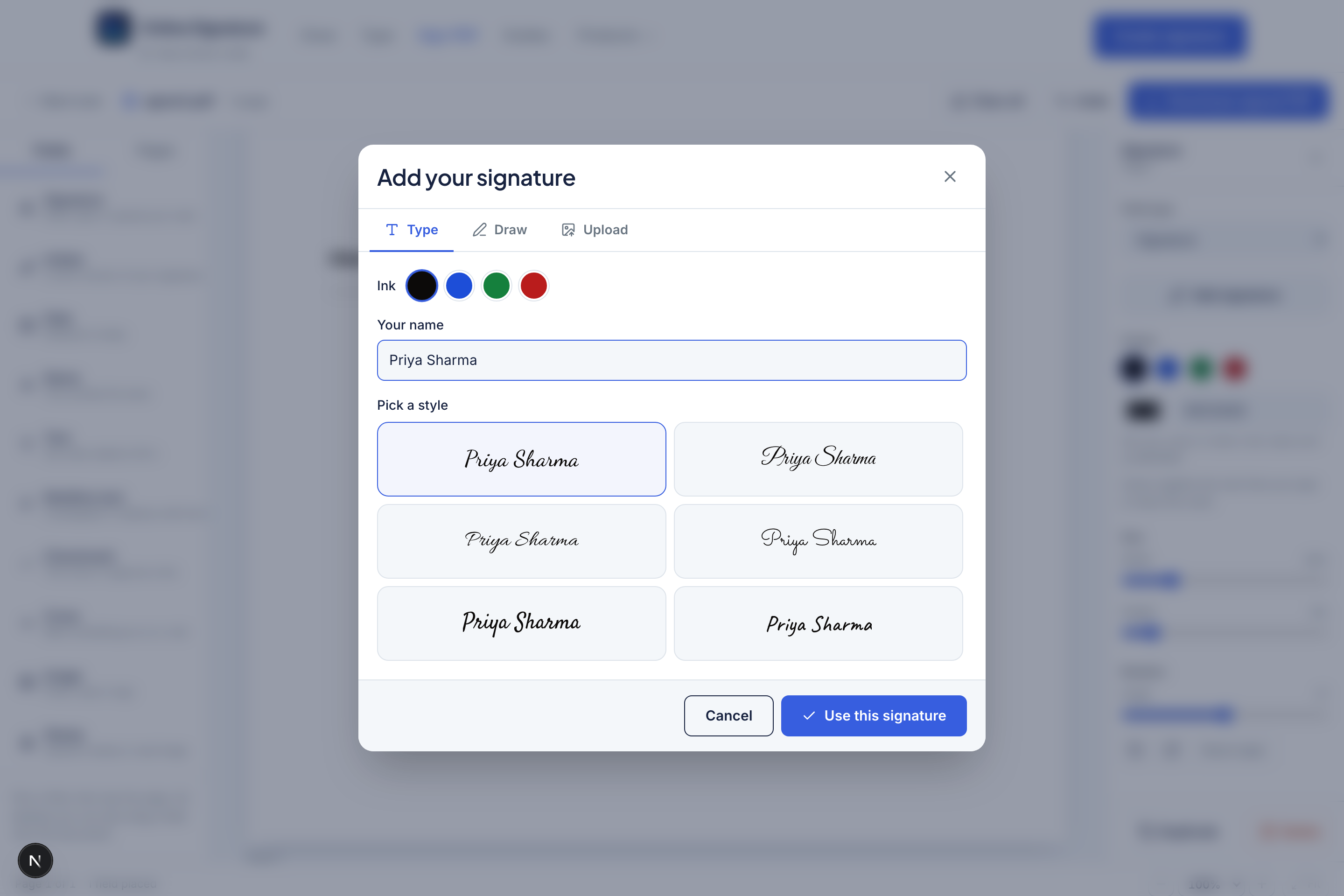
Type tab
- Enter the name or initials.
- Pick one of the 14 handwriting fonts.
- Choose ink from presets (same palette as Draw/Type tools).
- Confirm to place the rendered mark on the field.
Draw tab
- Sketch with mouse, finger or pen.
- Undo the last stroke or Clear the pad.
- Ink presets match the Type tab.
- Confirm to embed the drawing as a PNG on the field.
Upload tab
Upload an existing transparent PNG (best) or JPG. Use this when you already exported from Draw/Type, or when you have a scanned wet-ink signature cleaned in Stamp Maker tools.
Saved signatures
After you confirm a mark, Sign PDF can keep it in a short list (maximum six) on this browser. Next time you open capture, pick a saved mark instead of recreating it. Clear site data or use another device and the list will be empty — that is expected for privacy.
Image and stamp capture
Image and Stamp fields skip Type/Draw and only accept Upload, with a shortcut link to Stamp Maker when you need a company seal. Esc or clicking the backdrop closes the modal without changing the field.
Consistent ink across a document
Capture landlord and tenant marks in the same ink colour, or keep signatures blue and stamps red so roles are visually distinct.
Frequently asked questions
Where are saved signatures stored?
In your browser’s localStorage on this device only (up to six). They are not synced to Nelstack accounts or other computers.
What image types can I upload?
PNG or JPG up to 2 MB for signature/initials and for image/stamp fields.
How do I change a signature after placing it?
Select the field and choose Add/Change signature (or double-click the field) to reopen the capture modal.
Keep learning
- Sign PDF field types explained (with examples)Documentation for every Sign PDF field: signature, initials, date, name, text, multiline, checkmark, cross, image and stamp — sizes, fonts, colour and examples.
- How to draw a signature online and download a transparent PNGDraw a handwritten signature with mouse or finger. Adjust ink, stroke style, smoothing and taper, then download a free transparent PNG — private on your device.
- How to type a cursive signature online with handwriting fontsType your name in a handwriting font, pick ink colour, and download a free transparent PNG. 14 cursive styles — private in your browser.